Cart and Checkout Validation Function API
Use the Cart and Checkout Validation Function API to provide your own validation of a cart and checkout.
Cart and Checkout Validation Function API
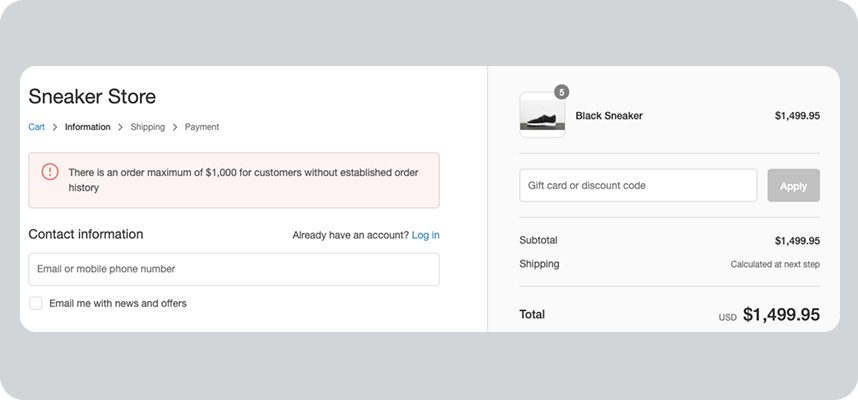
Cart and checkout validation implements checks and rules to ensure that orders meet specific criteria before allowing customers to proceed with their purchase. This includes express checkouts, such as Shop Pay, PayPal, Google Pay, and Apple Pay. To validate a cart and checkout, server-side, you can only use the Cart and Checkout Validation Function API.
Shopify Functions enables you to customize Shopify's backend logic. The Cart and Checkout Validation Function API integrates this logic into the checkout flow.
Use the API to generate the validations and to specify the message that should be displayed in checkout when the function returns a validation error. You can specify the checkout fields to target with the validation error message, and the cart as a global object to target with a validation error message.
Note:
You can activate a maximum of 25 validation functions on each store.
Errors from validation functions are exposed to the Storefront API's Cart object, in themes that use the cart template and during checkout.
Use cases
- Use tokengating or require a customer membership at checkout.
- Verify the age or ID of a customer when they proceed through checkout.
- Provide B2B product minimums, maximums, and multiples.
- Provide B2B location order minimums, maximums, or credit limits.
- Specify quantity limits in a flash sale.
- Validate purchase order numbers for B2B customers.
- Apply billing address restrictions.
Function target
Checkout
Compatibility with Shopify surfaces Supported (8) Partially supported (0) Unsupported (6)
-
B2B: Supported
-
Cart: Supported
-
Checkout: Supported
-
Create Order API: Not supported
-
Draft Order (Admin): Supported
-
Draft Order (Checkout): Supported
-
Order Edit (Admin): Not supported
-
Order Edit (Checkout): Not supported
-
POS: Not supported
-
Pre-order and Try Before You Buy: Not supported
-
Shopify Admin: Supported
-
Storefront: Supported
-
Storefront Accelerated Checkout: Supported
-
Subscription (Recurring Orders): Not supported
Fetch target Limited access
The fetch target is limited to custom apps installed on Enterprise stores. You'll also need to request network access for Functions, as it's not currently available on development stores or in a developer preview.
Getting started
Scaffolding the function using Shopify CLI will automatically configure your TOML file. You can alter the default configuration to customize the way your function operates.
Terminal
shopify app generate extension --template cart_checkout_validation
Tutorial - Build a Validation Function
Targets
A target is an identifier in shopify.extension.toml that specifies where you're injecting code into Shopify Function APIs, or other parts of the Shopify platform. Each target is composed of three to four namespaces. The name begins with a broad Shopify context and ends with the behavior of the extensible element.
Run target
cart.validations.generate.run
The run target generates cart and checkout validations using either Shopify data, hardcoded values, or fetch results from external providers. The target returns a list of operations to be applied to validations applied to the cart and checkout.
For example, you might use this to add a validation that, at checkout, confirms a customer's age meets the legal requirement to purchase a product in their cart.
-
Input
OBJECT
The
Inputobject is the complete GraphQL schema that your function can receive as input to validate cart and checkout. Your function receives only the fields that you request in the input query. To optimize performance, we highly recommend that you request only the fields that your function requires.-
buyerJourney
BuyerJourney!
non-null
Information about the current step in the buyer's purchasing process. The buyer journey helps you determine where the customer is in their shopping experience (for example, cart interaction, checkout interaction, or completing a checkout). You can use this information to apply appropriate validation rules based on the customer's current context and create a more tailored and performant shopping experience.
-
step
BuyerJourneyStep
- CART_INTERACTION, CHECKOUT_COMPLETION, CHECKOUT_INTERACTION
-
-
cart
Cart!
non-null
The cart where the Function is running. A cart contains the merchandise that a customer intends to purchase and information about the customer, such as the customer's email address and phone number.
-
attribute
Attribute
The custom attributes associated with a cart to store additional information. Cart attributes allow you to collect specific information from customers on the Cart page, such as order notes, gift wrapping requests, or custom product details. Attributes are stored as key-value pairs.
-
key
String
Arguments
The key of the cart attribute to retrieve. For example,
"gift_wrapping".
-
key
String!
non-null
Fields
The key or name of the attribute. For example,
"customer_first_order". -
value
String
The value of the attribute. For example,
"true".
-
-
billingAddress
MailingAddress
The billing address associated with the cart.
-
address1
String
The first line of the address. Typically the street address or PO Box number.
-
address2
String
The second line of the address. Typically the number of the apartment, suite, or unit.
-
city
String
The name of the city, district, village, or town.
-
company
String
The name of the customer's company or organization.
-
countryCode
CountryCode
The two-letter code for the country of the address. For example, US.
- AC, AD, AE, AF, AG, AI, AL, AM, AN, AO, AR, AT, AU, AW, AX, AZ, BA, BB, BD, BE, BF, BG, BH, BI, BJ, BL, BM, BN, BO, BQ, BR, BS, BT, BV, BW, BY, BZ, CA, CC, CD, CF, CG, CH, CI, CK, CL, CM, CN, CO, CR, CU, CV, CW, CX, CY, CZ, DE, DJ, DK, DM, DO, DZ, EC, EE, EG, EH, ER, ES, ET, FI, FJ, FK, FO, FR, GA, GB, GD, GE, GF, GG, GH, GI, GL, GM, GN, GP, GQ, GR, GS, GT, GW, GY, HK, HM, HN, HR, HT, HU, ID, IE, IL, IM, IN, IO, IQ, IR, IS, IT, JE, JM, JO, JP, KE, KG, KH, KI, KM, KN, KP, KR, KW, KY, KZ, LA, LB, LC, LI, LK, LR, LS, LT, LU, LV, LY, MA, MC, MD, ME, MF, MG, MK, ML, MM, MN, MO, MQ, MR, MS, MT, MU, MV, MW, MX, MY, MZ, NA, NC, NE, NF, NG, NI, NL, NO, NP, NR, NU, NZ, OM, PA, PE, PF, PG, PH, PK, PL, PM, PN, PS, PT, PY, QA, RE, RO, RS, RU, RW, SA, SB, SC, SD, SE, SG, SH, SI, SJ, SK, SL, SM, SN, SO, SR, SS, ST, SV, SX, SY, SZ, TA, TC, TD, TF, TG, TH, TJ, TK, TL, TM, TN, TO, TR, TT, TV, TW, TZ, UA, UG, UM, US, UY, UZ, VA, VC, VE, VG, VN, VU, WF, WS, XK, YE, YT, ZA, ZM, ZW, ZZ
-
firstName
String
The first name of the customer.
-
lastName
String
The last name of the customer.
-
latitude
Float
The approximate latitude of the address.
-
longitude
Float
The approximate longitude of the address.
-
name
String
The full name of the customer, based on firstName and lastName.
-
phone
String
A unique phone number for the customer. Formatted using E.164 standard. For example, +16135551111.
-
provinceCode
String
The alphanumeric code for the region. For example, ON.
-
zip
String
The zip or postal code of the address.
-
market
Market
Deprecated
-
handle
Handle!
non-null
A human-readable unique string for the market automatically generated from its title.
-
id
ID!
non-null
A globally-unique identifier.
-
metafield
Metafield
A custom field that stores additional information about a Shopify resource, such as products, orders, and many more. Using metafields with Shopify Functions enables you to customize the checkout experience.
-
namespace
String
Arguments
A category that organizes a group of metafields. Namespaces are used to prevent naming conflicts between different apps or different parts of the same app. If omitted, then the app-reserved namespace is used.
-
key
String!
required
The unique identifier for the metafield within its namespace. A metafield is composed of a namespace and a key, in the format
namespace.key.
-
jsonValue
JSON!
non-null
Fields
The data that's stored in the metafield, using JSON format.
-
type
String!
non-null
The type of data that the metafield stores in the
valuefield. -
value
String!
non-null
The data that's stored in the metafield. The data is always stored as a string, regardless of the metafield's type.
-
-
regions
[MarketRegion!]!
non-null
A geographic region which comprises a market.
-
name
String
The name of the region in the language of the current localization.
-
-
-
-
buyerIdentity
BuyerIdentity
Information about the customer that's interacting with the cart. It includes details such as the customer's email and phone number, and the total amount of money the customer has spent in the store. This information helps personalize the checkout experience and ensures that accurate pricing and delivery options are displayed to customers.
-
customer
Customer
The customer that's interacting with the cart.
-
amountSpent
MoneyV2!
non-null
The total amount that the customer has spent on orders. The amount is converted from the shop's currency to the currency of the cart using a market rate.
-
amount
Decimal!
non-null
A monetary value in decimal format, allowing for precise representation of cents or fractional currency. For example, 12.99.
-
currencyCode
CurrencyCode!
non-null
The three-letter currency code that represents a world currency used in a store. Currency codes include standard standard ISO 4217 codes, legacy codes, and non-standard codes. For example, USD.
- AED, AFN, ALL, AMD, ANG, AOA, ARS, AUD, AWG, AZN, BAM, BBD, BDT, BGN, BHD, BIF, BMD, BND, BOB, BRL, BSD, BTN, BWP, BYN, BZD, CAD, CDF, CHF, CLP, CNY, COP, CRC, CVE, CZK, DJF, DKK, DOP, DZD, EGP, ERN, ETB, EUR, FJD, FKP, GBP, GEL, GHS, GIP, GMD, GNF, GTQ, GYD, HKD, HNL, HRK, HTG, HUF, IDR, ILS, INR, IQD, IRR, ISK, JEP, JMD, JOD, JPY, KES, KGS, KHR, KID, KMF, KRW, KWD, KYD, KZT, LAK, LBP, LKR, LRD, LSL, LTL, LVL, LYD, MAD, MDL, MGA, MKD, MMK, MNT, MOP, MRU, MUR, MVR, MWK, MXN, MYR, MZN, NAD, NGN, NIO, NOK, NPR, NZD, OMR, PAB, PEN, PGK, PHP, PKR, PLN, PYG, QAR, RON, RSD, RUB, RWF, SAR, SBD, SCR, SDG, SEK, SGD, SHP, SLL, SOS, SRD, SSP, STN, SYP, SZL, THB, TJS, TMT, TND, TOP, TRY, TTD, TWD, TZS, UAH, UGX, USD, USDC, UYU, UZS, VED, VES, VND, VUV, WST, XAF, XCD, XOF, XPF, XXX, YER, ZAR, ZMW, BYR, STD, VEF
-
-
displayName
String!
non-null
The full name of the customer, based on the values for
firstNameandlastName. IffirstNameandlastNamearen't specified, then the value is the customer's email address. If the email address isn't specified, then the value is the customer's phone number. -
email
String
The customer's email address.
-
firstName
String
The customer's first name.
-
hasAnyTag
Boolean!
non-null
Whether the customer is associated with any of the specified tags. The customer must have at least one tag from the list to return
true.-
tags
[String!]!
requiredDefault:[]
Arguments
A comma-separated list of searchable keywords that are associated with the customer. For example,
"VIP, Gold"returns customers with either theVIPorGoldtag.
-
-
hasTags
[HasTagResponse!]!
non-null
Whether the customer is associated with the specified tags.
-
tags
[String!]!
requiredDefault:[]
Arguments
A comma-separated list of searchable keywords that are associated with the customer. For example,
"VIP, Gold"returns customers with both theVIPandGoldtags.
-
hasTag
Boolean!
non-null
Fields
Whether the Shopify resource has the tag.
-
tag
String!
non-null
A searchable keyword that's associated with a Shopify resource, such as a product or customer. For example, a merchant might apply the
sportsandsummertags to products that are associated with sportswear for summer.
-
-
id
ID!
non-null
A globally-unique ID for the customer.
-
lastName
String
The customer's last name.
-
metafield
Metafield
A custom field that stores additional information about a Shopify resource, such as products, orders, and many more. Using metafields with Shopify Functions enables you to customize the checkout experience.
-
numberOfOrders
Int!
non-null
The total number of orders that the customer has made at the store.
-
-
email
String
The email address of the customer that's interacting with the cart.
-
isAuthenticated
Boolean!
non-null
Whether the customer is authenticated through their customer account.
-
phone
String
The phone number of the customer that's interacting with the cart.
-
purchasingCompany
PurchasingCompany
The company of a B2B customer that's interacting with the cart. Used to manage and track purchases made by businesses rather than individual customers.
-
company
Company!
non-null
The company associated to the order or draft order.
-
createdAt
DateTime!
non-null
The date and time (ISO 8601 format) at which the company was created in Shopify.
-
externalId
String
A unique externally-supplied ID for the company.
-
id
ID!
non-null
The ID of the company.
-
metafield
Metafield
A custom field that stores additional information about a Shopify resource, such as products, orders, and many more. Using metafields with Shopify Functions enables you to customize the checkout experience.
-
name
String!
non-null
The name of the company.
-
updatedAt
DateTime!
non-null
The date and time (ISO 8601 format) at which the company was last modified.
-
-
contact
CompanyContact
The company contact associated to the order or draft order.
-
createdAt
DateTime!
non-null
The date and time (ISO 8601 format) at which the company contact was created in Shopify.
-
id
ID!
non-null
The ID of the company.
-
locale
String
The company contact's locale (language).
-
title
String
The company contact's job title.
-
updatedAt
DateTime!
non-null
The date and time (ISO 8601 format) at which the company contact was last modified.
-
-
location
CompanyLocation!
non-null
The company location associated to the order or draft order.
-
createdAt
DateTime!
non-null
The date and time (ISO 8601 format) at which the company location was created in Shopify.
-
externalId
String
A unique externally-supplied ID for the company.
-
id
ID!
non-null
The ID of the company.
-
locale
String
The preferred locale of the company location.
-
metafield
Metafield
A custom field that stores additional information about a Shopify resource, such as products, orders, and many more. Using metafields with Shopify Functions enables you to customize the checkout experience.
-
name
String!
non-null
The name of the company location.
-
ordersCount
Int!
non-null
The number of orders placed at this company location.
-
totalSpent
MoneyV2!
non-null
The total amount spent at this company location.
-
amount
Decimal!
non-null
A monetary value in decimal format, allowing for precise representation of cents or fractional currency. For example, 12.99.
-
currencyCode
CurrencyCode!
non-null
The three-letter currency code that represents a world currency used in a store. Currency codes include standard standard ISO 4217 codes, legacy codes, and non-standard codes. For example, USD.
-
-
updatedAt
DateTime!
non-null
The date and time (ISO 8601 format) at which the company location was last modified.
-
-
-
-
cost
CartCost!
non-null
A breakdown of the costs that the customer will pay at checkout. It includes the total amount, the subtotal before taxes and duties, the tax amount, and duty charges.
-
subtotalAmount
MoneyV2!
non-null
The amount, before taxes and cart-level discounts, for the customer to pay.
-
amount
Decimal!
non-null
A monetary value in decimal format, allowing for precise representation of cents or fractional currency. For example, 12.99.
-
currencyCode
CurrencyCode!
non-null
The three-letter currency code that represents a world currency used in a store. Currency codes include standard standard ISO 4217 codes, legacy codes, and non-standard codes. For example, USD.
-
-
totalAmount
MoneyV2!
non-null
The total amount for the customer to pay at checkout.
-
amount
Decimal!
non-null
A monetary value in decimal format, allowing for precise representation of cents or fractional currency. For example, 12.99.
-
currencyCode
CurrencyCode!
non-null
The three-letter currency code that represents a world currency used in a store. Currency codes include standard standard ISO 4217 codes, legacy codes, and non-standard codes. For example, USD.
-
-
totalDutyAmount
MoneyV2
The duty charges for a customer to pay at checkout.
-
amount
Decimal!
non-null
A monetary value in decimal format, allowing for precise representation of cents or fractional currency. For example, 12.99.
-
currencyCode
CurrencyCode!
non-null
The three-letter currency code that represents a world currency used in a store. Currency codes include standard standard ISO 4217 codes, legacy codes, and non-standard codes. For example, USD.
-
-
totalTaxAmount
MoneyV2
The total tax amount for the customer to pay at checkout.
-
amount
Decimal!
non-null
A monetary value in decimal format, allowing for precise representation of cents or fractional currency. For example, 12.99.
-
currencyCode
CurrencyCode!
non-null
The three-letter currency code that represents a world currency used in a store. Currency codes include standard standard ISO 4217 codes, legacy codes, and non-standard codes. For example, USD.
-
-
-
deliverableLines
[DeliverableCartLine!]!
non-null
The items in a cart that are eligible for fulfillment and can be delivered to the customer.
-
attribute
Attribute
The custom attributes associated with a cart to store additional information. Cart attributes allow you to collect specific information from customers on the Cart page, such as order notes, gift wrapping requests, or custom product details. Attributes are stored as key-value pairs.
Cart line attributes are equivalent to the
line_itemobject in Liquid. -
id
ID!
non-null
The ID of the cart line.
-
merchandise
Merchandise!
non-null
The item that the customer intends to purchase.
-
CustomProduct
OBJECT
A custom product represents a product that doesn't map to Shopify's standard product categories. For example, you can use a custom product to manage gift cards, shipping requirements, localized product information, or weight measurements and conversions.
-
isGiftCard
Boolean!
non-null
Whether the merchandise is a gift card.
-
requiresShipping
Boolean!
non-null
Whether the item needs to be shipped to the customer. For example, a digital gift card doesn't need to be shipped, but a t-shirt does need to be shipped.
-
title
String!
non-null
The localized name for the product that displays to customers. The title is used to construct the product's handle, which is a unique, human-readable string of the product's title. For example, if a product is titled "Black Sunglasses", then the handle is
black-sunglasses. -
weight
Float
The product variant's weight, in the system of measurement set in the
weightUnitfield. -
weightUnit
WeightUnit!
non-null
The unit of measurement for weight.
- GRAMS, KILOGRAMS, OUNCES, POUNDS
-
-
ProductVariant
OBJECT
A specific version of a product that comes in more than one option, such as size or color. For example, if a merchant sells t-shirts with options for size and color, then a small, blue t-shirt would be one product variant and a large, blue t-shirt would be another.
-
id
ID!
non-null
A globally-unique ID for the product variant.
-
metafield
Metafield
A custom field that stores additional information about a Shopify resource, such as products, orders, and many more. Using metafields with Shopify Functions enables you to customize the checkout experience.
-
product
Product!
non-null
The product associated with the product variant. For example, if a merchant sells t-shirts with options for size and color, then a small, blue t-shirt would be one product variant and a large, blue t-shirt would be another. The product associated with the product variant would be the t-shirt itself.
-
handle
Handle!
non-null
A unique, human-readable string of the product's title. A handle can contain letters, hyphens (
-), and numbers, but not spaces. The handle is used in the online store URL for the product. For example, if a product is titled "Black Sunglasses", then the handle isblack-sunglasses. -
hasAnyTag
Boolean!
non-null
Whether the product is associated with any of the specified tags. The product must have at least one tag from the list to return
true. -
hasTags
[HasTagResponse!]!
non-null
Whether the product is associated with the specified tags.
-
id
ID!
non-null
A globally-unique ID for the product.
-
inAnyCollection
Boolean!
non-null
Whether the product is in any of the specified collections. The product must be in at least one collection from the list to return
true.A collection is a group of products that can be displayed in online stores and other sales channels in categories, which makes it easy for customers to find them. For example, an athletics store might create different collections for running attire and accessories.
-
inCollections
[CollectionMembership!]!
non-null
Whether the product is in the specified collections. The product must be in all of the collections in the list to return
true.A collection is a group of products that can be displayed in online stores and other sales channels in categories, which makes it easy for customers to find them. For example, an athletics store might create different collections for running attire and accessories.
-
ids
[ID!]!
requiredDefault:[]
Arguments
A comma-separated list of globally-unique collection IDs that are associated with the product. For example,
gid://shopify/Collection/123,gid://shopify/Collection/456.
-
collectionId
ID!
non-null
Fields
A globally-unique ID for the collection.
-
isMember
Boolean!
non-null
Whether the product is in the specified collection.
-
-
isGiftCard
Boolean!
non-null
Whether the product is a gift card.
-
metafield
Metafield
A custom field that stores additional information about a Shopify resource, such as products, orders, and many more. Using metafields with Shopify Functions enables you to customize the checkout experience.
-
productType
String
A custom category for a product. Product types allow merchants to define categories other than the ones available in Shopify's standard product categories.
-
title
String!
non-null
The localized name for the product that displays to customers. The title is used to construct the product's handle, which is a unique, human-readable string of the product's title. For example, if a product is titled "Black Sunglasses", then the handle is
black-sunglasses. -
vendor
String
The name of the product's vendor.
-
-
requiresShipping
Boolean!
non-null
Whether the item needs to be shipped to the customer. For example, a digital gift card doesn't need to be shipped, but a t-shirt does need to be shipped.
-
sku
String
A case-sensitive identifier for the product variant in the merchant's store. For example,
"BBC-1". A product variant must have a SKU to be connected to a fulfillment service. -
title
String
The localized name for the product variant that displays to customers.
-
weight
Float
The product variant's weight, in the system of measurement set in the
weightUnitfield. -
weightUnit
WeightUnit!
non-null
The unit of measurement for weight.
-
-
-
quantity
Int!
non-null
The quantity of the item that the customer intends to purchase.
-
-
deliveryGroups
[CartDeliveryGroup!]!
non-null
A collection of items that are grouped by shared delivery characteristics. Delivery groups streamline fulfillment by organizing items that can be shipped together, based on the customer's shipping address. For example, if a customer orders a t-shirt and a pair of shoes that can be shipped together, then the items are included in the same delivery group.
In the Order Discount and Product Discount legacy APIs, the
cart.deliveryGroupsinput is always an empty array. This means you can't access delivery groups when creating Order Discount or Product Discount Functions. If you need to apply discounts to shipping costs, then use the Discount Function API instead.-
cartLines
[CartLine!]!
non-null
Information about items in a cart that a customer intends to purchase. A cart line is an entry in the customer's cart that represents a single unit of a product variant. For example, if a customer adds two different sizes of the same t-shirt to their cart, then each size is represented as a separate cart line.
-
attribute
Attribute
The custom attributes associated with a cart to store additional information. Cart attributes allow you to collect specific information from customers on the Cart page, such as order notes, gift wrapping requests, or custom product details. Attributes are stored as key-value pairs.
Cart line attributes are equivalent to the
line_itemobject in Liquid. -
cost
CartLineCost!
non-null
The cost of an item in a cart that the customer intends to purchase. Cart lines are entries in the customer's cart that represent a single unit of a product variant. For example, if a customer adds two different sizes of the same t-shirt to their cart, then each size is represented as a separate cart line.
-
discountAllocations
[DiscountAllocation!]!
non-null
The discounts that have been applied to the cart line.
-
discountApplication
DiscountApplication!
non-null
The discount that was applied.
-
allocationMethod
DiscountApplicationAllocationMethod!
non-null
The method by which the discount's value is allocated to its entitled items.
- ACROSS, EACH
-
metafield
Metafield
A custom field that stores additional information about a Shopify resource, such as products, orders, and many more. Using metafields with Shopify Functions enables you to customize the checkout experience.
-
targetSelection
DiscountApplicationTargetSelection!
non-null
The lines on the cart targeted by the discount.
- ALL, ENTITLED, EXPLICIT
-
targetType
DiscountApplicationTarget!
non-null
The type of line (i.e. line item or shipping line) on a cart that the discount is applicable towards.
- LINE_ITEM, SHIPPING_LINE
-
totalAllocatedAmount
MoneyV2!
non-null
The total allocated amount of the discount across all items.
-
amount
Decimal!
non-null
A monetary value in decimal format, allowing for precise representation of cents or fractional currency. For example, 12.99.
-
currencyCode
CurrencyCode!
non-null
The three-letter currency code that represents a world currency used in a store. Currency codes include standard standard ISO 4217 codes, legacy codes, and non-standard codes. For example, USD.
-
-
value
PricingValue!
non-null
The value of the discount.
-
MoneyV2
OBJECT
A precise monetary value and its associated currency. Combines a decimal amount with a three-letter currency code to express prices, costs, and other financial values throughout the API. For example, 12.99 USD.
-
amount
Decimal!
non-null
A monetary value in decimal format, allowing for precise representation of cents or fractional currency. For example, 12.99.
-
currencyCode
CurrencyCode!
non-null
The three-letter currency code that represents a world currency used in a store. Currency codes include standard standard ISO 4217 codes, legacy codes, and non-standard codes. For example, USD.
-
-
PricingPercentageValue
OBJECT
The percentage value of a discount.
-
value
Decimal!
non-null
The percentage value of the discount.
-
-
-
-
discountedAmount
MoneyV2!
non-null
The amount that was discounted.
-
amount
Decimal!
non-null
A monetary value in decimal format, allowing for precise representation of cents or fractional currency. For example, 12.99.
-
currencyCode
CurrencyCode!
non-null
The three-letter currency code that represents a world currency used in a store. Currency codes include standard standard ISO 4217 codes, legacy codes, and non-standard codes. For example, USD.
-
-
-
id
ID!
non-null
The ID of the cart line.
-
merchandise
Merchandise!
non-null
The item that the customer intends to purchase.
-
parentRelationship
CartLineParentRelationship
The nested relationship between this line and its parent line, if any.
-
parent
CartLine!
non-null
The parent line in the relationship.
-
-
quantity
Int!
non-null
The quantity of the item that the customer intends to purchase.
-
sellingPlanAllocation
SellingPlanAllocation
The selling plan associated with the cart line, including information about how a product variant can be sold and purchased.
-
priceAdjustments
[SellingPlanAllocationPriceAdjustment!]!
non-null
A list of price adjustments, with a maximum of two. When there are two, the first price adjustment goes into effect at the time of purchase, while the second one starts after a certain number of orders. A price adjustment represents how a selling plan affects pricing when a variant is purchased with a selling plan. Prices display in the customer's currency if the shop is configured for it.
-
perDeliveryPrice
MoneyV2!
non-null
The effective price for a single delivery. For example, for a prepaid subscription plan that includes 6 deliveries at the price of $48.00, the per delivery price is $8.00.
-
amount
Decimal!
non-null
A monetary value in decimal format, allowing for precise representation of cents or fractional currency. For example, 12.99.
-
currencyCode
CurrencyCode!
non-null
The three-letter currency code that represents a world currency used in a store. Currency codes include standard standard ISO 4217 codes, legacy codes, and non-standard codes. For example, USD.
-
-
price
MoneyV2!
non-null
The price of the variant when it's purchased with a selling plan For example, for a prepaid subscription plan that includes 6 deliveries of $10.00 granola, where the customer gets 20% off, the price is 6 x $10.00 x 0.80 = $48.00.
-
amount
Decimal!
non-null
A monetary value in decimal format, allowing for precise representation of cents or fractional currency. For example, 12.99.
-
currencyCode
CurrencyCode!
non-null
The three-letter currency code that represents a world currency used in a store. Currency codes include standard standard ISO 4217 codes, legacy codes, and non-standard codes. For example, USD.
-
-
-
sellingPlan
SellingPlan!
non-null
A representation of how products and variants can be sold and purchased. For example, an individual selling plan could be '6 weeks of prepaid granola, delivered weekly'.
-
description
String
The description of the selling plan.
-
id
ID!
non-null
A globally-unique identifier.
-
metafield
Metafield
A custom field that stores additional information about a Shopify resource, such as products, orders, and many more. Using metafields with Shopify Functions enables you to customize the checkout experience.
-
name
String!
non-null
The name of the selling plan. For example, '6 weeks of prepaid granola, delivered weekly'.
-
recurringDeliveries
Boolean!
non-null
Whether purchasing the selling plan will result in multiple deliveries.
-
-
-
-
deliveryAddress
MailingAddress
The shipping or destination address associated with the delivery group.
-
address1
String
The first line of the address. Typically the street address or PO Box number.
-
address2
String
The second line of the address. Typically the number of the apartment, suite, or unit.
-
city
String
The name of the city, district, village, or town.
-
company
String
The name of the customer's company or organization.
-
countryCode
CountryCode
The two-letter code for the country of the address. For example, US.
-
firstName
String
The first name of the customer.
-
lastName
String
The last name of the customer.
-
latitude
Float
The approximate latitude of the address.
-
longitude
Float
The approximate longitude of the address.
-
name
String
The full name of the customer, based on firstName and lastName.
-
phone
String
A unique phone number for the customer. Formatted using E.164 standard. For example, +16135551111.
-
provinceCode
String
The alphanumeric code for the region. For example, ON.
-
zip
String
The zip or postal code of the address.
-
market
Market
Deprecated
-
-
deliveryOptions
[CartDeliveryOption!]!
non-null
The delivery options available for the delivery group. Delivery options are the different ways that customers can choose to have their orders shipped. Examples include express shipping or standard shipping.
-
code
String
A unique identifier that represents the delivery option offered to customers. For example,
Canada Post Expedited. -
cost
MoneyV2!
non-null
The amount that the customer pays if they select the delivery option.
-
deliveryMethodType
DeliveryMethod!
non-null
The delivery method associated with the delivery option. A delivery method is a way that merchants can fulfill orders from their online stores. Delivery methods include shipping to an address, local pickup, and shipping to a pickup point, all of which are natively supported by Shopify checkout.
- LOCAL, NONE, PICK_UP, PICKUP_POINT, RETAIL, SHIPPING
-
description
String
A single-line description of the delivery option, with HTML tags removed.
-
handle
Handle!
non-null
A unique, human-readable identifier of the delivery option's title. A handle can contain letters, hyphens (
-), and numbers, but not spaces. For example,standard-shipping. -
title
String
The name of the delivery option that displays to customers. The title is used to construct the delivery option's handle. For example, if a delivery option is titled "Standard Shipping", then the handle is
standard-shipping.
-
-
discountAllocations
[DiscountAllocation!]!
non-null
The discounts that have been applied to the delivery group.
-
groupType
CartDeliveryGroupType!
non-null
The type of merchandise in the delivery group.
- ONE_TIME_PURCHASE, SUBSCRIPTION
-
id
ID!
non-null
A globally-unique ID for the delivery group.
-
selectedDeliveryOption
CartDeliveryOption
Information about the delivery option that the customer has selected.
-
code
String
A unique identifier that represents the delivery option offered to customers. For example,
Canada Post Expedited. -
cost
MoneyV2!
non-null
The amount that the customer pays if they select the delivery option.
-
deliveryMethodType
DeliveryMethod!
non-null
The delivery method associated with the delivery option. A delivery method is a way that merchants can fulfill orders from their online stores. Delivery methods include shipping to an address, local pickup, and shipping to a pickup point, all of which are natively supported by Shopify checkout.
-
description
String
A single-line description of the delivery option, with HTML tags removed.
-
handle
Handle!
non-null
A unique, human-readable identifier of the delivery option's title. A handle can contain letters, hyphens (
-), and numbers, but not spaces. For example,standard-shipping. -
title
String
The name of the delivery option that displays to customers. The title is used to construct the delivery option's handle. For example, if a delivery option is titled "Standard Shipping", then the handle is
standard-shipping.
-
-
-
discountApplications
[DiscountApplication!]!
non-null
The discounts that have been applied to the cart.
-
allocationMethod
DiscountApplicationAllocationMethod!
non-null
The method by which the discount's value is allocated to its entitled items.
-
metafield
Metafield
A custom field that stores additional information about a Shopify resource, such as products, orders, and many more. Using metafields with Shopify Functions enables you to customize the checkout experience.
-
targetSelection
DiscountApplicationTargetSelection!
non-null
The lines on the cart targeted by the discount.
-
targetType
DiscountApplicationTarget!
non-null
The type of line (i.e. line item or shipping line) on a cart that the discount is applicable towards.
-
totalAllocatedAmount
MoneyV2!
non-null
The total allocated amount of the discount across all items.
-
value
PricingValue!
non-null
The value of the discount.
-
-
lines
[CartLine!]!
non-null
The items in a cart that the customer intends to purchase. A cart line is an entry in the customer's cart that represents a single unit of a product variant. For example, if a customer adds two different sizes of the same t-shirt to their cart, then each size is represented as a separate cart line.
-
attribute
Attribute
The custom attributes associated with a cart to store additional information. Cart attributes allow you to collect specific information from customers on the Cart page, such as order notes, gift wrapping requests, or custom product details. Attributes are stored as key-value pairs.
Cart line attributes are equivalent to the
line_itemobject in Liquid. -
cost
CartLineCost!
non-null
The cost of an item in a cart that the customer intends to purchase. Cart lines are entries in the customer's cart that represent a single unit of a product variant. For example, if a customer adds two different sizes of the same t-shirt to their cart, then each size is represented as a separate cart line.
-
discountAllocations
[DiscountAllocation!]!
non-null
The discounts that have been applied to the cart line.
-
id
ID!
non-null
The ID of the cart line.
-
merchandise
Merchandise!
non-null
The item that the customer intends to purchase.
-
parentRelationship
CartLineParentRelationship
The nested relationship between this line and its parent line, if any.
-
quantity
Int!
non-null
The quantity of the item that the customer intends to purchase.
-
sellingPlanAllocation
SellingPlanAllocation
The selling plan associated with the cart line, including information about how a product variant can be sold and purchased.
-
-
localizedFields
[LocalizedField!]!
non-null
The additional fields on the Cart page that are required for international orders in specific countries, such as customs information or tax identification numbers.
-
keys
[LocalizedFieldKey!]!
requiredDefault:[]
Arguments
The keys of the localized fields to retrieve.
- SHIPPING_CREDENTIAL_BR, SHIPPING_CREDENTIAL_CL, SHIPPING_CREDENTIAL_CN, SHIPPING_CREDENTIAL_CO, SHIPPING_CREDENTIAL_CR, SHIPPING_CREDENTIAL_EC, SHIPPING_CREDENTIAL_ES, SHIPPING_CREDENTIAL_GT, SHIPPING_CREDENTIAL_ID, SHIPPING_CREDENTIAL_KR, SHIPPING_CREDENTIAL_MX, SHIPPING_CREDENTIAL_MY, SHIPPING_CREDENTIAL_PE, SHIPPING_CREDENTIAL_PT, SHIPPING_CREDENTIAL_PY, SHIPPING_CREDENTIAL_TR, SHIPPING_CREDENTIAL_TW, SHIPPING_CREDENTIAL_TYPE_CO, TAX_CREDENTIAL_BR, TAX_CREDENTIAL_CL, TAX_CREDENTIAL_CO, TAX_CREDENTIAL_CR, TAX_CREDENTIAL_EC, TAX_CREDENTIAL_ES, TAX_CREDENTIAL_GT, TAX_CREDENTIAL_ID, TAX_CREDENTIAL_IT, TAX_CREDENTIAL_MX, TAX_CREDENTIAL_MY, TAX_CREDENTIAL_PE, TAX_CREDENTIAL_PT, TAX_CREDENTIAL_PY, TAX_CREDENTIAL_TR, TAX_CREDENTIAL_TYPE_CO, TAX_CREDENTIAL_TYPE_MX, TAX_CREDENTIAL_USE_MX, TAX_EMAIL_IT
-
key
LocalizedFieldKey!
non-null
Fields
The key of the localized field.
- SHIPPING_CREDENTIAL_BR, SHIPPING_CREDENTIAL_CL, SHIPPING_CREDENTIAL_CN, SHIPPING_CREDENTIAL_CO, SHIPPING_CREDENTIAL_CR, SHIPPING_CREDENTIAL_EC, SHIPPING_CREDENTIAL_ES, SHIPPING_CREDENTIAL_GT, SHIPPING_CREDENTIAL_ID, SHIPPING_CREDENTIAL_KR, SHIPPING_CREDENTIAL_MX, SHIPPING_CREDENTIAL_MY, SHIPPING_CREDENTIAL_PE, SHIPPING_CREDENTIAL_PT, SHIPPING_CREDENTIAL_PY, SHIPPING_CREDENTIAL_TR, SHIPPING_CREDENTIAL_TW, SHIPPING_CREDENTIAL_TYPE_CO, TAX_CREDENTIAL_BR, TAX_CREDENTIAL_CL, TAX_CREDENTIAL_CO, TAX_CREDENTIAL_CR, TAX_CREDENTIAL_EC, TAX_CREDENTIAL_ES, TAX_CREDENTIAL_GT, TAX_CREDENTIAL_ID, TAX_CREDENTIAL_IT, TAX_CREDENTIAL_MX, TAX_CREDENTIAL_MY, TAX_CREDENTIAL_PE, TAX_CREDENTIAL_PT, TAX_CREDENTIAL_PY, TAX_CREDENTIAL_TR, TAX_CREDENTIAL_TYPE_CO, TAX_CREDENTIAL_TYPE_MX, TAX_CREDENTIAL_USE_MX, TAX_EMAIL_IT
-
title
String!
non-null
The title of the localized field.
-
value
String
The value of the localized field.
-
-
metafield
Metafield
A custom field that stores additional information about a Shopify resource, such as products, orders, and many more. Using metafields with Shopify Functions enables you to customize the checkout experience.
-
poNumber
String
A purchase order number associated with the cart, often used for B2B transactions to reference the buyer's internal purchase order.
-
retailLocation
Location
The physical location where a retail order is created or completed.
-
address
LocationAddress!
non-null
The address of this location.
-
address1
String
The first line of the address for the location.
-
address2
String
The second line of the address for the location.
-
city
String
The city of the location.
-
country
String
The country of the location.
-
countryCode
String
The country code of the location.
-
formatted
[String!]!
non-null
A formatted version of the address for the location.
-
latitude
Float
The approximate latitude coordinates of the location.
-
longitude
Float
The approximate longitude coordinates of the location.
-
phone
String
The phone number of the location.
-
province
String
The province of the location.
-
provinceCode
String
The code for the province, state, or district of the address of the location.
-
zip
String
The ZIP code of the location.
-
-
handle
Handle!
non-null
The location handle.
-
id
ID!
non-null
The location id.
-
metafield
Metafield
A custom field that stores additional information about a Shopify resource, such as products, orders, and many more. Using metafields with Shopify Functions enables you to customize the checkout experience.
-
name
String!
non-null
The name of the location.
-
-
-
fetchResult
HttpResponse
The
FunctionFetchResultobject is the result of the fetch target. This is the response that Shopify returns after executing the HTTP request defined in your fetch target, and that is passed as input to the run target. For more information, refer to network access for Shopify Functions.-
body
String
The HTTP response body as a plain string. Use this field when the body is not in JSON format.
-
header
HttpResponseHeader
An HTTP header.
-
name
String!
required
Arguments
A case-insensitive header name.
-
name
String!
non-null
Fields
Header name.
-
value
String!
non-null
Header value.
-
-
jsonBody
JSON
The HTTP response body parsed as JSON. If the body is valid JSON, it will be parsed and returned as a JSON object. If parsing fails, then raw body is returned as a string. Use this field when you expect the response to be JSON, or when you're dealing with mixed response types, meaning both JSON and non-JSON. Using this field reduces function instruction consumption and ensures that the data is formatted in logs. To prevent increasing the function target input size unnecessarily, avoid querying both
bodyandjsonBodysimultaneously. -
status
Int!
non-null
The HTTP status code.
-
headers
[HttpResponseHeader!]!
non-nullDeprecated
-
name
String!
non-null
Header name.
-
value
String!
non-null
Header value.
-
-
-
localization
Localization!
non-null
The regional and language settings that determine how the Function handles currency, numbers, dates, and other locale-specific values during discount calculations. These settings are based on the store's configured localization practices.
-
country
Country!
non-null
The country for which the store is customized, reflecting local preferences and regulations. Localization might influence the language, currency, and product offerings available in a store to enhance the shopping experience for customers in that region.
-
isoCode
CountryCode!
non-null
The ISO code of the country.
- AC, AD, AE, AF, AG, AI, AL, AM, AN, AO, AR, AT, AU, AW, AX, AZ, BA, BB, BD, BE, BF, BG, BH, BI, BJ, BL, BM, BN, BO, BQ, BR, BS, BT, BV, BW, BY, BZ, CA, CC, CD, CF, CG, CH, CI, CK, CL, CM, CN, CO, CR, CU, CV, CW, CX, CY, CZ, DE, DJ, DK, DM, DO, DZ, EC, EE, EG, EH, ER, ES, ET, FI, FJ, FK, FO, FR, GA, GB, GD, GE, GF, GG, GH, GI, GL, GM, GN, GP, GQ, GR, GS, GT, GW, GY, HK, HM, HN, HR, HT, HU, ID, IE, IL, IM, IN, IO, IQ, IR, IS, IT, JE, JM, JO, JP, KE, KG, KH, KI, KM, KN, KP, KR, KW, KY, KZ, LA, LB, LC, LI, LK, LR, LS, LT, LU, LV, LY, MA, MC, MD, ME, MF, MG, MK, ML, MM, MN, MO, MQ, MR, MS, MT, MU, MV, MW, MX, MY, MZ, NA, NC, NE, NF, NG, NI, NL, NO, NP, NR, NU, NZ, OM, PA, PE, PF, PG, PH, PK, PL, PM, PN, PS, PT, PY, QA, RE, RO, RS, RU, RW, SA, SB, SC, SD, SE, SG, SH, SI, SJ, SK, SL, SM, SN, SO, SR, SS, ST, SV, SX, SY, SZ, TA, TC, TD, TF, TG, TH, TJ, TK, TL, TM, TN, TO, TR, TT, TV, TW, TZ, UA, UG, UM, US, UY, UZ, VA, VC, VE, VG, VN, VU, WF, WS, XK, YE, YT, ZA, ZM, ZW, ZZ
-
-
language
Language!
non-null
The language for which the store is customized, ensuring content is tailored to local customers. This includes product descriptions and customer communications that resonate with the target audience.
-
isoCode
LanguageCode!
non-null
The ISO code.
-
-
market
Market!
non-nullDeprecated
-
-
presentmentCurrencyRate
Decimal!
non-null
The exchange rate used to convert discounts between the shop's default currency and the currency that displays to the customer during checkout. For example, if a store operates in USD but a customer is viewing discounts in EUR, then the presentment currency rate handles this conversion for accurate pricing.
-
shop
Shop!
non-null
Information about the shop where the Function is running, including the shop's timezone setting and associated metafields.
-
localTime
LocalTime!
non-null
The current time based on the store's timezone setting.
-
date
Date!
non-null
The current date relative to the parent object.
-
dateTimeAfter
Boolean!
non-null
Returns true if the current date and time is at or past the given date and time, and false otherwise.
-
dateTimeBefore
Boolean!
non-null
Returns true if the current date and time is before the given date and time, and false otherwise.
-
dateTimeBetween
Boolean!
non-null
Returns true if the current date and time is between the two given date and times, and false otherwise.
-
timeAfter
Boolean!
non-null
Returns true if the current time is at or past the given time, and false otherwise.
-
timeBefore
Boolean!
non-null
Returns true if the current time is at or past the given time, and false otherwise.
-
timeBetween
Boolean!
non-null
Returns true if the current time is between the two given times, and false otherwise.
-
-
metafield
Metafield
A custom field that stores additional information about a Shopify resource, such as products, orders, and many more. Using metafields with Shopify Functions enables you to customize the checkout experience.
-
metaobject
Metaobject
Fetch a specific Metaobject by one of its unique identifiers. Only app-owned metaobjects with the $app reserved prefix are accessible to functions.
-
handle
MetaobjectHandleInput
Arguments
The handle and type of the metaobject.
-
handle
String!
non-null
The handle of the metaobject to retrieve.
-
type
String!
non-null
The type of the metaobject. Must match an existing metaobject definition type.
-
-
id
ID
The ID of the metaobject.
-
field
MetaobjectField
Fields
The field for an object key, or null if the key has no field definition.
-
key
String!
required
Arguments
The metaobject key to access.
-
jsonValue
JSON
Fields
The assigned field value in JSON format.
-
key
String!
non-null
The object key of this field.
-
type
String!
non-null
The type of the field.
-
value
String
The assigned field value, always stored as a string regardless of the field type.
-
-
handle
String!
non-null
The unique handle of the metaobject, useful as a custom ID.
-
type
String!
non-null
The type of the metaobject.
-
-
-
validation
Validation!
non-null
The configuration of the app that owns the Function. This configuration controls how merchants can define validation rules for carts and checkout, such as inventory checks, price validations, or custom purchase restrictions.
-
metafield
Metafield
A custom field that stores additional information about a Shopify resource, such as products, orders, and many more. Using metafields with Shopify Functions enables you to customize the checkout experience.
-
-
Run function
The logic that processes the input data to generate a standardized list of operations that apply to the cart or checkout.
Each operation specifies validations to apply. When a function returns a validation error, Shopify processes your response to add error messages to targeted fields during checkout. You can also use $.cart to target the current checkout page of the customer.
The return must follow the schema defined in the CartValidationsGenerateRunResult object.
-
CartValidationsGenerateRunResult
OBJECT
The
CartValidationsGenerateRunResultobject is the output of the function run target. The object contains the validation operations that apply to the cart or checkout.-
operations
[Operation!]!
non-null
An ordered list of operations to be executed for the validations associated with the cart and checkout processes.
-
validationAdd
ValidationAddOperation
An operation that adds validations to the cart and checkout. For example, you might add a validation that, at checkout, confirms a customer's age meets the legal requirement to purchase a product in their cart.
-
errors
[ValidationError!]!
non-null
The validation errors that block a customer from proceeding through checkout. The errors are grouped by target.
-
message
String!
non-null
A description of the validation error. For example, "The product is out of stock" or "The product isn't available for purchase in your region".
-
target
String!
non-null
The identifier in
shopify.extension.tomlthat specifies where you're injecting code in the checkout process.
-
-
-
-
Examples
-
Prevent shipping to PO boxes
This example implements a Shopify function that prevents using a PO Box as a shipping address during checkout.
cart.validations.generate.run
Input Query (Rust)
query Input {
  cart {
    deliveryGroups {
      deliveryAddress {
        address1
        address2
      }
    }
  }
}
Input Query (JavaScript)
query CartValidationsGenerateRunInput {
  cart {
    deliveryGroups {
      deliveryAddress {
        address1
        address2
      }
    }
  }
}
Input Object (Rust)
{
  "cart": {
    "deliveryGroups": [
      {
        "deliveryAddress": {
          "address1": "PO Box 123",
          "address2": null
        }
      }
    ]
  }
}
Input Object (JavaScript)
{
  "cart": {
    "deliveryGroups": [
      {
        "deliveryAddress": {
          "address1": "PO Box 123",
          "address2": null
        }
      }
    ]
  }
}
Function Code (Rust)
use crate::schema;
use shopify_function::prelude::*;
use shopify_function::Result;

#[shopify_function]
fn cart_validations_generate_run(input: schema::run::Input) -> Result<schema::CartValidationsGenerateRunResult> {
    let mut operations = Vec::new();
    let mut errors = Vec::new();

    for group in input.cart().delivery_groups() {
        let Some(address) = &group.delivery_address() else { continue };

        let address1 = address.address_1().map_or("", |v| v);
        let address2 = address.address_2().map_or("", |v| v);

        if is_po_box(address1) || is_po_box(address2) {
            errors.push(schema::ValidationError {
                message: "PO Box addresses are not allowed for shipping.".to_string(),
                target: "$.cart.deliveryGroups[0].deliveryAddress.address1".to_string(),
            });
        }
    }

    let operation = schema::ValidationAddOperation { errors };
    operations.push(schema::Operation::ValidationAdd(operation));

    Ok(schema::CartValidationsGenerateRunResult { operations })
}

fn is_po_box(address: &str) -> bool {
    let normalized = address.to_ascii_lowercase().replace(".", "").replace(" ", "");
    normalized.contains("pobox") || normalized.contains("afpo") || normalized.contains("postoffice") || normalized.contains("postbox")
}
Performance Cost (Rust)
28850 instructions
Function Code (JavaScript)
// @ts-check

/**
 * @typedef {import("../generated/api").CartValidationsGenerateRunInput} CartValidationsGenerateRunInput
 * @typedef {import("../generated/api").CartValidationsGenerateRunResult} CartValidationsGenerateRunResult
 */

// Add type definitions to match Rust implementation
/**
 * @typedef {Object} DeliveryAddress
 * @property {string | null} [address1]
 * @property {string | null} [address2]
 */

/**
 * @typedef {Object} DeliveryGroup
 * @property {DeliveryAddress | null} [deliveryAddress]
 */

/**
 * @typedef {Object} Cart
 * @property {DeliveryGroup[]} deliveryGroups
 */

/**
 * @param {string} address
 * @returns {boolean}
 */
function isPoBox(address) {
  const normalized = address.toLowerCase().replace(/\./g, '').replace(/\s/g, '');
  return normalized.includes('pobox') ||
         normalized.includes('afpo') ||
         normalized.includes('postoffice') ||
         normalized.includes('postbox');
}

/**
 * @param {CartValidationsGenerateRunInput & { cart: Cart }} input
 * @returns {CartValidationsGenerateRunResult}
 */
export function cartValidationsGenerateRun(input) {
  const errors = [];

  for (const group of input.cart.deliveryGroups) {
    if (!group.deliveryAddress) continue;

    const address1 = group.deliveryAddress.address1 || '';
    const address2 = group.deliveryAddress.address2 || '';

    if (isPoBox(address1) || isPoBox(address2)) {
      errors.push({
        message: "PO Box addresses are not allowed for shipping.",
        target: "$.cart.deliveryGroups[0].deliveryAddress.address1"
      });
    }
  }

  const operations = [
    {
      validationAdd: {
        errors
      },
    },
  ];

  return { operations };
}
Performance Cost (JavaScript)
222785 instructions
Output JSON (Rust)
{
  "operations": [
    {
      "validationAdd": {
        "errors": [
          {
            "message": "PO Box addresses are not allowed for shipping.",
            "target": "$.cart.deliveryGroups[0].deliveryAddress.address1"
          }
        ]
      }
    }
  ]
}
Output JSON (JavaScript)
{ "operations": [ { "validationAdd": { "errors": [ { "message": "PO Box addresses are not allowed for shipping.", "target": "$.cart.deliveryGroups[0].deliveryAddress.address1" } ] } } ] } -
Validate required localized fields at checkout
This example implements a Shopify function that adds a configurable validation to one or more localized fields such as tax credentials stored in an app owned metafield.
cart.validations.generate.run
Input Query (Rust)
query Input($localizedFields: [LocalizedFieldKey!]! = []) {
  cart {
    localizedFields(keys: $localizedFields) {
      key
      title
      value
    }
  }
  buyerJourney {
    step
  }
}
Input Query (JavaScript)
query CartValidationsGenerateRunInput($localizedFields: [LocalizedFieldKey!]! = []) {
  cart {
    localizedFields(keys: $localizedFields) {
      key
      title
      value
    }
  }
  buyerJourney {
    step
  }
}
Input Object (Rust)
{
  "cart": {
    "localizedFields": [
      {
        "key": "TAX_CREDENTIAL_USE_MX",
        "title": "Tax Usage (Mexico)",
        "value": null
      },
      {
        "key": "TAX_CREDENTIAL_TYPE_MX",
        "title": "Tax Type (Mexico)",
        "value": ""
      }
    ]
  },
  "buyerJourney": {
    "step": "CHECKOUT_COMPLETION"
  }
}
Input Object (JavaScript)
{
  "cart": {
    "localizedFields": [
      {
        "key": "TAX_CREDENTIAL_USE_MX",
        "title": "Tax Usage (Mexico)",
        "value": null
      },
      {
        "key": "TAX_CREDENTIAL_TYPE_MX",
        "title": "Tax Type (Mexico)",
        "value": ""
      }
    ]
  },
  "buyerJourney": {
    "step": "CHECKOUT_COMPLETION"
  }
}
Function Code (Rust)
use crate::schema;
use shopify_function::prelude::*;
use shopify_function::Result;

#[shopify_function]
fn cart_validations_generate_run(input: schema::run::Input) -> Result<schema::CartValidationsGenerateRunResult> {
    let mut operations = Vec::new();
    let mut errors = Vec::new();

    // Validate only during checkout completion
    if input.buyer_journey().step() == Some(&schema::BuyerJourneyStep::CheckoutCompletion) {
        for field in input.cart().localized_fields() {
            if field.value().is_none() || field.value().as_ref().unwrap().trim().is_empty() {
                // Use the title for user-facing message, key for the target path
                let field_key = format!("{}", field.key());
                errors.push(schema::ValidationError {
                    message: format!("The field '{}' is required to complete checkout.", field.title()),
                    target: format!("$.cart.localizedFields.{}", field_key),
                });
            }
        }
    }

    let operation = schema::ValidationAddOperation { errors };
    operations.push(schema::Operation::ValidationAdd(operation));

    Ok(schema::CartValidationsGenerateRunResult { operations })
}
Performance Cost (Rust)
41956 instructions
Function Code (JavaScript)
// @ts-check

/**
 * @typedef {import("../generated/api").CartValidationsGenerateRunInput} CartValidationsGenerateRunInput
 * @typedef {import("../generated/api").CartValidationsGenerateRunResult} CartValidationsGenerateRunResult
 */

/**
 * @param {CartValidationsGenerateRunInput} input
 * @returns {CartValidationsGenerateRunResult}
 */
export function cartValidationsGenerateRun(input) {
  const errors = [];

  // Validate only during checkout completion
  if (input.buyerJourney?.step === 'CHECKOUT_COMPLETION') {
    for (const field of input.cart.localizedFields) {
      if (!field.value || field.value.trim() === '') {
        errors.push({
          message: `The field '${field.title}' is required to complete checkout.`,
          target: `$.cart.localizedFields.${field.key}`
        });
      }
    }
  }

  const operations = [
    {
      validationAdd: {
        errors
      },
    },
  ];

  return { operations };
}
Performance Cost (JavaScript)
203540 instructions
Output JSON (Rust)
{
  "operations": [
    {
      "validationAdd": {
        "errors": [
          {
            "message": "The field 'Tax Usage (Mexico)' is required to complete checkout.",
            "target": "$.cart.localizedFields.TAX_CREDENTIAL_USE_MX"
          },
          {
            "message": "The field 'Tax Type (Mexico)' is required to complete checkout.",
            "target": "$.cart.localizedFields.TAX_CREDENTIAL_TYPE_MX"
          }
        ]
      }
    }
  ]
}
Output JSON (JavaScript)
{ "operations": [ { "validationAdd": { "errors": [ { "message": "The field 'Tax Usage (Mexico)' is required to complete checkout.", "target": "$.cart.localizedFields.TAX_CREDENTIAL_USE_MX" }, { "message": "The field 'Tax Type (Mexico)' is required to complete checkout.", "target": "$.cart.localizedFields.TAX_CREDENTIAL_TYPE_MX" } ] } } ] } -
Add validation to one or more localized fields
This example implements a Shopify function that adds a configurable validation to one or more localized fields such as tax credentials stored in an app owned metafield.
cart.validations.generate.run
Input Query (Rust)
query Input($localizedFields: [LocalizedFieldKey!]! = []) {
  cart {
    localizedFields(keys: $localizedFields) {
      key
      title
      value
    }
  }
  buyerJourney {
    step
  }
}
Input Query (JavaScript)
query CartValidationsGenerateRunInput($localizedFields: [LocalizedFieldKey!]! = []) {
  cart {
    localizedFields(keys: $localizedFields) {
      key
      title
      value
    }
  }
  buyerJourney {
    step
  }
}
Input Object (Rust)
{
  "cart": {
    "localizedFields": [
      {
        "key": "TAX_CREDENTIAL_USE_MX",
        "title": "Tax Usage (Mexico)",
        "value": null
      },
      {
        "key": "TAX_CREDENTIAL_TYPE_MX",
        "title": "Tax Type (Mexico)",
        "value": ""
      }
    ]
  },
  "buyerJourney": {
    "step": "CHECKOUT_COMPLETION"
  }
}
Input Object (JavaScript)
{
  "cart": {
    "localizedFields": [
      {
        "key": "TAX_CREDENTIAL_USE_MX",
        "title": "Tax Usage (Mexico)",
        "value": null
      },
      {
        "key": "TAX_CREDENTIAL_TYPE_MX",
        "title": "Tax Type (Mexico)",
        "value": ""
      }
    ]
  },
  "buyerJourney": {
    "step": "CHECKOUT_COMPLETION"
  }
}
Function Code (Rust)
use crate::schema;
use shopify_function::prelude::*;
use shopify_function::Result;

#[shopify_function]
fn cart_validations_generate_run(input: schema::run::Input) -> Result<schema::CartValidationsGenerateRunResult> {
    let mut operations = Vec::new();
    let mut errors = Vec::new();

    // Validate only during checkout completion
    if input.buyer_journey().step() == Some(&schema::BuyerJourneyStep::CheckoutCompletion) {
        for field in input.cart().localized_fields() {
            if field.value().is_none() || field.value().as_ref().unwrap().trim().is_empty() {
                // Use the title for user-facing message, key for the target path
                let field_key = format!("{}", field.key());
                errors.push(schema::ValidationError {
                    message: format!("The field '{}' is required to complete checkout.", field.title()),
                    target: format!("$.cart.localizedFields.{}", field_key),
                });
            }
        }
    }

    let operation = schema::ValidationAddOperation { errors };
    operations.push(schema::Operation::ValidationAdd(operation));

    Ok(schema::CartValidationsGenerateRunResult { operations })
}
Performance Cost (Rust)
41956 instructions
Function Code (JavaScript)
// @ts-check

/**
 * @typedef {import("../generated/api").CartValidationsGenerateRunInput} CartValidationsGenerateRunInput
 * @typedef {import("../generated/api").CartValidationsGenerateRunResult} CartValidationsGenerateRunResult
 */

/**
 * @param {CartValidationsGenerateRunInput} input
 * @returns {CartValidationsGenerateRunResult}
 */
export function cartValidationsGenerateRun(input) {
  const errors = [];

  // Validate only during checkout completion
  if (input.buyerJourney?.step === 'CHECKOUT_COMPLETION') {
    for (const field of input.cart.localizedFields) {
      if (!field.value || field.value.trim() === '') {
        errors.push({
          message: `The field '${field.title}' is required to complete checkout.`,
          target: `$.cart.localizedFields.${field.key}`
        });
      }
    }
  }

  const operations = [
    {
      validationAdd: {
        errors
      },
    },
  ];

  return { operations };
}
Performance Cost (JavaScript)
203540 instructions
Output JSON (Rust)
{
  "operations": [
    {
      "validationAdd": {
        "errors": [
          {
            "message": "The field 'Tax Usage (Mexico)' is required to complete checkout.",
            "target": "$.cart.localizedFields.TAX_CREDENTIAL_USE_MX"
          },
          {
            "message": "The field 'Tax Type (Mexico)' is required to complete checkout.",
            "target": "$.cart.localizedFields.TAX_CREDENTIAL_TYPE_MX"
          }
        ]
      }
    }
  ]
}
Output JSON (JavaScript)
{ "operations": [ { "validationAdd": { "errors": [ { "message": "The field 'Tax Usage (Mexico)' is required to complete checkout.", "target": "$.cart.localizedFields.TAX_CREDENTIAL_USE_MX" }, { "message": "The field 'Tax Type (Mexico)' is required to complete checkout.", "target": "$.cart.localizedFields.TAX_CREDENTIAL_TYPE_MX" } ] } } ] } -
Validate a gift note attribute on the cart
This example implements a Shopify function that validates a required line item attribute is set during checkout completion or interaction.
cart.validations.generate.run
Input Query (Rust)
query Input {
  cart {
    a1: attribute(key: "gift_note") {
      key
      value
    }
    a2: attribute(key: "gift_note_validated") {
      key
      value
    }
  }
  buyerJourney {
    step
  }
}
Input Query (JavaScript)
query CartValidationsGenerateRunInput {
  cart {
    a1: attribute(key: "gift_note") {
      key
      value
    }
    a2: attribute(key: "gift_note_validated") {
      key
      value
    }
  }
  buyerJourney {
    step
  }
}
Input Object (Rust)
{
  "cart": {
    "a1": null,
    "a2": null
  },
  "buyerJourney": {
    "step": "CHECKOUT_COMPLETION"
  }
}
Input Object (JavaScript)
{
  "cart": {
    "a1": null,
    "a2": null
  },
  "buyerJourney": {
    "step": "CHECKOUT_COMPLETION"
  }
}
Function Code (Rust)
use crate::schema;
use shopify_function::prelude::*;
use shopify_function::Result;

#[shopify_function]
fn cart_validations_generate_run(input: schema::run::Input) -> Result<schema::CartValidationsGenerateRunResult> {
    let mut operations = Vec::new();
    let mut errors = Vec::new();

    // Only validate during checkout steps
    if input.buyer_journey().step() == Some(&schema::BuyerJourneyStep::CheckoutInteraction)
        || input.buyer_journey().step() == Some(&schema::BuyerJourneyStep::CheckoutCompletion)
    {
        // Check if gift note is present or already validated
        let is_validated = input
            .cart()
            .a_2()
            .and_then(|attr| attr.value())
            .map(|value| value == "true")
            .unwrap_or(false);

        if input.cart().a_1().is_none() && !is_validated {
            errors.push(schema::ValidationError {
                message: "Gift note is required for this cart".to_string(),
                target: "$.cart".to_string(),
            });
        }
    }

    let operation = schema::ValidationAddOperation { errors };
    operations.push(schema::Operation::ValidationAdd(operation));

    Ok(schema::CartValidationsGenerateRunResult { operations })
}
Performance Cost (Rust)
20992 instructions
Function Code (JavaScript)
// @ts-check

/**
 * @typedef {import("../generated/api").CartValidationsGenerateRunInput} CartValidationsGenerateRunInput
 * @typedef {import("../generated/api").CartValidationsGenerateRunResult} CartValidationsGenerateRunResult
 * @typedef {import("../generated/api").ValidationError} ValidationError
 */

/**
 * @param {CartValidationsGenerateRunInput} input
 * @returns {CartValidationsGenerateRunResult}
 */
export function cartValidationsGenerateRun(input) {
  // Early return if not in checkout steps
  const step = input.buyerJourney.step;
  if (step !== 'CHECKOUT_INTERACTION' && step !== 'CHECKOUT_COMPLETION') {
    return { operations: [] };
  }

  // Check validation status once
  const isValidated = input.cart.a2?.value === 'true';
  if (isValidated || input.cart.a1) {
    return { operations: [] };
  }

  // Return error if validation fails
  const errors = [{
    message: "Gift note is required for this cart",
    target: "$.cart"
  }]

  const operations = [
    {
      validationAdd: {
        errors
      },
    },
  ];

  return { operations };
}
Performance Cost (JavaScript)
144300 instructions
Output JSON (Rust)
{
  "operations": [
    {
      "validationAdd": {
        "errors": [
          {
            "message": "Gift note is required for this cart",
            "target": "$.cart"
          }
        ]
      }
    }
  ]
}
Output JSON (JavaScript)
{ "operations": [ { "validationAdd": { "errors": [ { "message": "Gift note is required for this cart", "target": "$.cart" } ] } } ] } -
Limit product quantity based on product metafields
This example checks a metafield for a limit (if it exists) and limits the quantity of a product to that limit.
cart.validations.generate.run
Input Query (Rust)
query Input {
  cart {
    lines {
      id
      quantity
      merchandise {
        __typename
        ... on ProductVariant {
          product {
            id
            metafield(namespace: "custom", key: "limits") {
              value
            }
          }
        }
      }
    }
  }
}
Input Query (JavaScript)
query CartValidationsGenerateRunInput {
  cart {
    lines {
      id
      quantity
      merchandise {
        __typename
        ... on ProductVariant {
          product {
            id
            metafield(namespace: "custom", key: "limits") {
              value
            }
          }
        }
      }
    }
  }
}
Input Object (Rust)
{
  "cart": {
    "lines": [
      {
        "id": "gid://shopify/CartLine/1",
        "quantity": 6,
        "merchandise": {
          "__typename": "ProductVariant",
          "product": {
            "id": "gid://shopify/Product/123",
            "metafield": {
              "value": "5"
            }
          }
        }
      }
    ]
  }
}
Input Object (JavaScript)
{
  "cart": {
    "lines": [
      {
        "id": "gid://shopify/CartLine/1",
        "quantity": 6,
        "merchandise": {
          "__typename": "ProductVariant",
          "product": {
            "id": "gid://shopify/Product/123",
            "metafield": {
              "value": "5"
            }
          }
        }
      }
    ]
  }
}
Function Code (Rust)
use crate::schema;
use shopify_function::prelude::*;
use shopify_function::Result;

#[shopify_function]
fn cart_validations_generate_run(input: schema::run::Input) -> Result<schema::CartValidationsGenerateRunResult> {
    let mut operations = Vec::new();
    let mut errors = Vec::new();

    for line in input.cart().lines().iter() {
        let product = match &line.merchandise() {
            schema::run::input::cart::lines::Merchandise::ProductVariant(variant) => &variant.product(),
            _ => continue,
        };

        if let Some(metafield) = &product.metafield() {
            if let Ok(limit) = metafield.value().parse::<i32>() {
                if *line.quantity() > limit {
                    errors.push(schema::ValidationError {
                        message: format!(
                            "You can only purchase up to {} units of this product.",
                            limit
                        ),
                        target: "$.cart".to_string(),
                    });
                }
            }
        }
    }

    let operation = schema::ValidationAddOperation { errors };
    operations.push(schema::Operation::ValidationAdd(operation));

    Ok(schema::CartValidationsGenerateRunResult { operations })
}
Performance Cost (Rust)
30862 instructions
Function Code (JavaScript)
// @ts-check

/**
 * @typedef {import("../generated/api").CartValidationsGenerateRunInput} CartValidationsGenerateRunInput
 * @typedef {import("../generated/api").CartValidationsGenerateRunResult} CartValidationsGenerateRunResult
 * @typedef {import("../generated/api").ValidationError} ValidationError
 */

/**
 * @param {CartValidationsGenerateRunInput} input
 * @returns {CartValidationsGenerateRunResult}
 */
export function cartValidationsGenerateRun(input) {
  const errors = [];

  for (const line of input.cart.lines) {
    // Skip if not a product variant
    if (line.merchandise.__typename !== 'ProductVariant') {
      continue;
    }

    const product = line.merchandise.product;

    if (product.metafield) {
      const limit = parseInt(product.metafield.value, 10);

      if (!isNaN(limit) && line.quantity > limit) {
        errors.push({
          message: `You can only purchase up to ${limit} units of this product.`,
          target: "$.cart"
        });
      }
    }
  }

  const operations = [
    {
      validationAdd: {
        errors
      },
    },
  ];

  return { operations };
}
Performance Cost (JavaScript)
186324 instructions
Output JSON (Rust)
{
  "operations": [
    {
      "validationAdd": {
        "errors": [
          {
            "message": "You can only purchase up to 5 units of this product.",
            "target": "$.cart"
          }
        ]
      }
    }
  ]
}
Output JSON (JavaScript)
{
  "operations": [
    {
      "validationAdd": {
        "errors": [
          {
            "message": "You can only purchase up to 5 units of this product.",
            "target": "$.cart"
          }
        ]
      }
    }
  ]
}
Supported checkout field targets
The following checkout fields are supported as targets for validation errors:
| Field | Target value |
| - | - |
| cart | $.cart |
| email | $.cart.buyerIdentity.email |
| phone | $.cart.buyerIdentity.phone |
| deliveryAddress.address1 | $.cart.deliveryGroups[0].deliveryAddress.address1 |
| deliveryAddress.address2 | $.cart.deliveryGroups[0].deliveryAddress.address2 |
| deliveryAddress.city | $.cart.deliveryGroups[0].deliveryAddress.city |
| deliveryAddress.company | $.cart.deliveryGroups[0].deliveryAddress.company |
| deliveryAddress.countryCode | $.cart.deliveryGroups[0].deliveryAddress.countryCode |
| deliveryAddress.firstName | $.cart.deliveryGroups[0].deliveryAddress.firstName |
| deliveryAddress.lastName | $.cart.deliveryGroups[0].deliveryAddress.lastName |
| deliveryAddress.phone | $.cart.deliveryGroups[0].deliveryAddress.phone |
| deliveryAddress.provinceCode | $.cart.deliveryGroups[0].deliveryAddress.provinceCode |
| deliveryAddress.zip | $.cart.deliveryGroups[0].deliveryAddress.zip |
| billingAddress.address1 | $.cart.billingAddress.address1 |
| billingAddress.address2 | $.cart.billingAddress.address2 |
| billingAddress.city | $.cart.billingAddress.city |
| billingAddress.company | $.cart.billingAddress.company |
| billingAddress.countryCode | $.cart.billingAddress.countryCode |
| billingAddress.firstName | $.cart.billingAddress.firstName |
| billingAddress.lastName | $.cart.billingAddress.lastName |
| billingAddress.phone | $.cart.billingAddress.phone |
| billingAddress.provinceCode | $.cart.billingAddress.provinceCode |
| billingAddress.zip | $.cart.billingAddress.zip |
| poNumber | $.cart.poNumber |
| localizedFields | $.cart.localizedfield.key |
Note:
Checkouts and orders can include multiple delivery methods, such as shipping and pickup in the same order. When your app uses delivery or fulfillment data, iterate over all delivery groups or fulfillment orders to determine the delivery method for each one. Don't assume one method for the order. For more information, refer to split carts in checkout.
Additional resources
Explore comprehensive guides and references to help you build, deploy, and optimize your Shopify Functions.
Working with Functions
These guides cover essential concepts for building Shopify Functions effectively. Learn how functions process data, execute during checkout, and handle versioning, localization, and external APIs.
Explore how functions process input data and generate operations.
Learn when Function APIs execute during the checkout process.
Understand schema versioning, release and upgrade requirements.
Check which Shopify plans support functions in custom apps.
Localize functions for international markets.
Configure Functions to fetch data from external APIs.
Performance and troubleshooting
Optimize function performance and ensure reliable operation from development through production deployment.
Resource limits and performance
Understand function performance requirements and resource limitations for optimal execution.
Test and debug Shopify Functions
Explore comprehensive testing workflows from local development to production deployment.
Considerations for programming languages
Choose languages that compile to WebAssembly for optimal function performance.
Monitoring and handling errors in production
Master testing and debugging workflows for reliable function development.